
For Plex & Jellyfin · Apple TV, iPhone, iPad, Mac & Windows

Your library,
curated.

You own hundreds of great movies and still scroll for twenty minutes. Curatio learns what you like from what you've watched, picks tonight's movie from what's already on your Plex or Jellyfin server, and plays it in full quality.

Also for Mac and Windows · All apps

Works with Plex Works with Jellyfin Apple TV 4K iPhone iPad Mac Windows Web Roku · soon
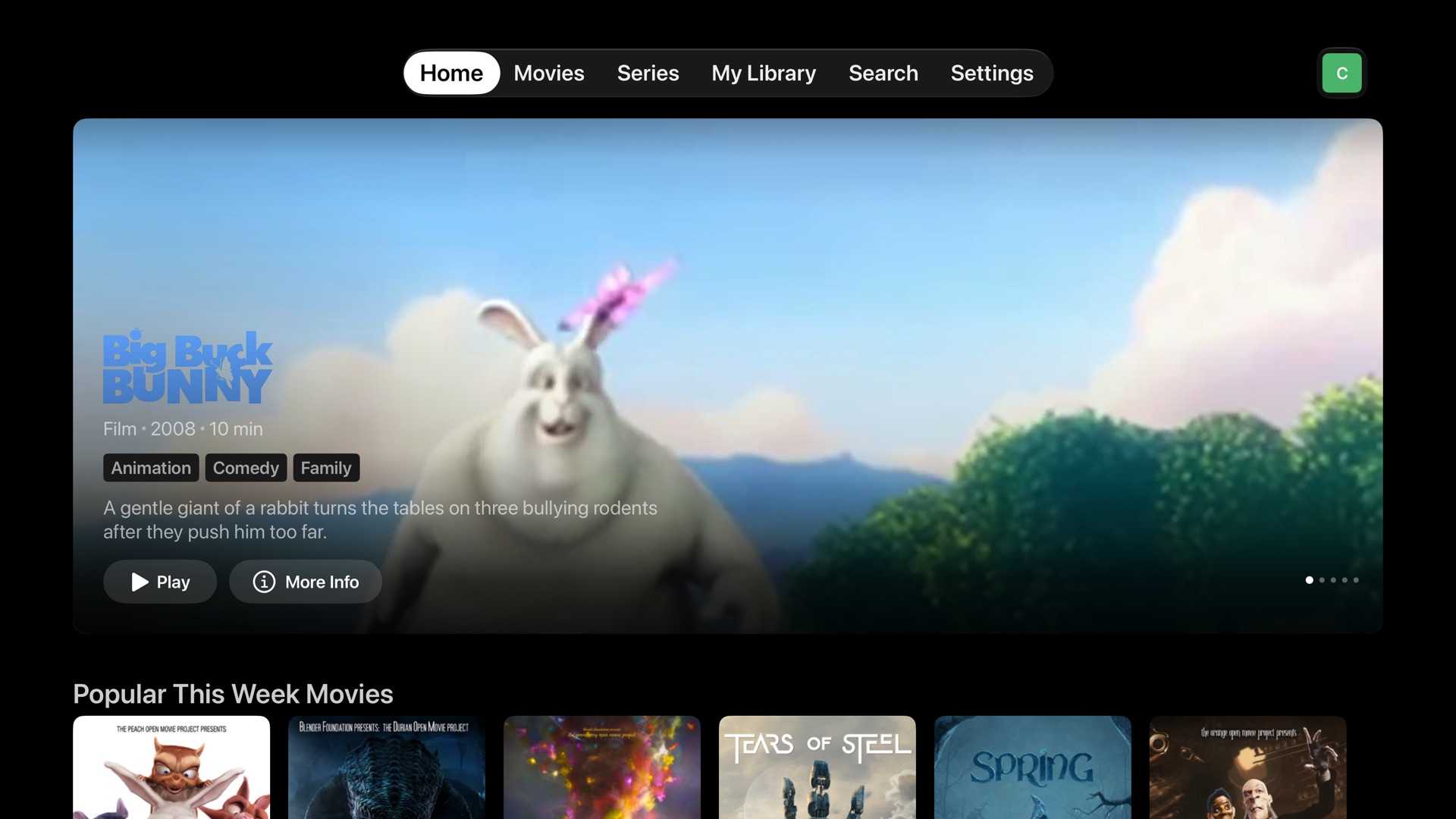
Curatio Home on Apple TV: a large featured title with Play and More Info, and a row of movie posters below
Curatio on Apple TV, showing the built-in sample library.
Free
No subscription, no ads, no account with us
Your media
Stays on your Plex or Jellyfin server
Your server
Curatio runs on hardware you control

Plex stores your movies. Curatio helps you pick one.

Plex and Jellyfin are great at holding a library. They're not great at helping you choose from it. Curatio sits on top of them and does exactly that.

Rows picked from what you own.

Switch Home to My Servers and every row comes from your own library: Top Picks on Your Servers, Because You Watched, Unwatched, Short Tonight, Hidden Gems You Own, Haven't Watched in Years. Switch to Everything to discover what you don't have yet, with your titles marked.

Personal from day one

Curatio reads what you've already watched on Plex or Jellyfin, so your first Home screen is about you, not a generic catalog.

Picks that explain themselves

Every recommendation says why it's there: "Because you watched Heat" or "Slow-Burn · Heist". No mystery algorithm.

Not for me

Long-press anything you'll never watch. It disappears everywhere, and Curatio steers away from things like it.

Know when it arrives

Found something you don't own? Save it to your Watchlist and get told when it shows up on your server.

A player that respects the file

Original quality by default, 4K and HDR, surround sound, and a direct route on your home network. If one server can't play a title, Curatio tries the other.

Skip intros and credits

Intro and credit markers come from community databases and, as a fallback, from audio fingerprinting on your own server.

Profiles for everyone

Invite family and friends. Each profile has its own picks, Watchlist and progress, and resumes where you left off on any device.

Secure by default

Passkeys with an authenticator-app backup, invite-only sign-up, and Plex/Jellyfin tokens that never leave your server.

Keep Plex or Jellyfin.
Add Curatio on top.

Your movies stay where they are. Curatio Server is a small, free program you run next to Plex or Jellyfin, at home or on a VPS. It learns your taste, builds your rows and signs you in. The apps talk to it, and the video still comes from your own media server.

Docker Plex & Jellyfin TMDB metadata Optional AI tagging Admin dashboard MIT licensed
$ git clone github.com/curatio-app/curatio
$ cd curatio/deploy
$ cp .env.example .env && nano .env
$ docker compose --profile https up -d
✓ Plex connected · 1,240 movies, 87 shows
✓ Watch history imported
✓ Home ready

Up and running in about 20 minutes

You need a Plex or Jellyfin server, a computer, NAS or VPS that can run Docker (Unraid users: install it from Community Applications), a domain name for secure access (recommended), and a free TMDB API key. The install guide walks through every command.

1

Get your free keys

Create a TMDB API key (required) and an MDBList key (recommended, for ratings). An AI key is optional.

2

Start Curatio Server

Download the install kit, fill in .env, and run docker compose up -d. Point your domain at it for HTTPS.

3

Connect Plex or Jellyfin

Sign in to the admin page and open Integrations. Sign in with Plex, or enter your Jellyfin address. Your library and watch history sync in a few minutes.

4

Create accounts and pair

Make an invite and create your account. Then install Curatio on Apple TV, iPhone, iPad, Mac or Windows and sign in; on Apple TV, enter the code it shows at your server's pairing page.

On the screens you already use

Curatio is on the App Store as Curatio Media Player for Apple TV, iPhone and iPad, and there's a desktop app for Mac and Windows. The web app comes with Curatio Server. Roku is on the way.

Apple TV
tvOS 18.6 or later
Download on the App Store →
iPhone & iPad
iOS 17.5 or later
Download on the App Store →
Web
Any modern browser
Included with Curatio Server
Roku
Roku TV and streaming players
Coming soon

Questions

Does Curatio replace Plex or Jellyfin?

No. Keep your media server exactly as it is. Curatio connects to it, reads which titles you have and what you've watched, and plays the files from it. You can keep using the Plex or Jellyfin apps alongside Curatio.

What do I need?

A Plex or Jellyfin server, a computer, NAS or VPS that can run Docker, and a free TMDB API key. A domain name is recommended so the apps can connect securely from anywhere. An MDBList key adds ratings, and an AI key (Gemini, Claude, OpenAI or a local model) makes recommendations sharper. Both are optional.

Is it really free?

Yes. No subscription, no ads, and no account with us. If you choose an AI provider for tagging, you pay that provider directly, usually a few cents for a whole library. You can set a monthly cap or use a free local model instead.

Where are my files, and who sees my library?

Your files never move: they stay on your Plex or Jellyfin server. Curatio Server runs on your hardware and stores your library list, watch history and settings there. If you turn on AI tagging, the titles of your movies and shows are sent to the AI provider you chose so it can tag them.

How does it know what I like?

From what you've watched: in Curatio, and on Plex or Jellyfin if you allow it. Every title has descriptive tags (mood, themes, pace, era), and Curatio finds titles that share the tags of things you finished, steering away from anything you marked "Not for me".

Can I watch away from home?

Yes, as long as your Curatio Server and your media server are reachable from the internet, for example through a domain with HTTPS, or a VPN like Tailscale. At home, the apps connect to your media server directly for the best quality.

Can my family use it?

Yes. Send each person an invite. Every profile has its own recommendations, Watchlist and progress. Watch history from Plex or Jellyfin is used for the server owner's profile automatically, and any profile can switch it on or off in Settings.

Which devices are supported?

Apple TV (tvOS 18.6 or later), iPhone and iPad (iOS 17.5 or later) from the App Store, the desktop app for Mac and Windows, and any modern web browser. A Roku app is coming soon.

Contact us

Setup help, bugs, ideas or privacy requests. We reply by email.

Please don't include passwords, API keys or your server's address. We only use your email to reply.

Your data stays yours

Last updated: November 2026

What we collect

Nothing. Curatio has no analytics, no telemetry and no account with us. The apps talk only to the Curatio Server you run and the media servers it connects to.

Your server

Your library list, watch history, Watchlist, profiles and settings are stored on your own Curatio Server. You control them, and deleting a profile deletes its data.

AI tagging (optional)

If you turn it on, titles and public descriptions of your movies and shows are sent to the AI provider you choose. No account or viewing data is sent. A local model keeps everything on your hardware.

Local network access

The apps ask for local network access so they can play directly from your media server at home. Nothing on your network is sent anywhere else.

Credentials

App credentials are kept in your device's Keychain. Plex and Jellyfin tokens stay encrypted on your Curatio Server; the apps only receive short-lived playback links.

Third parties

Metadata and artwork come from TMDB. If you enable iCloud sync, app preferences sync through your own iCloud account. Questions? Use the form above.